Losing the enable password on a production Catalyst 9200 does not require a factory reset, and it does not require losing the running configuration. IOS-XE provides a bootloader variable that tells the switch to start without reading its startup configuration, which gives unrestricted access to privileged EXEC mode. From there the saved configuration is merged back in, new credentials are set, and the bootloader variable is cleared.
The procedure below was performed on a Catalyst C9200L-48P-4G, and the console captures come from that recovery. It applies to the Catalyst 9200 and 9200L, and the same sequence works on the 9300 and 9400 families.
How It Works
The whole recovery reduces to three ideas:
ROMMON: ignore startup-config  →  boot with no configuration and no password
IOS:    merge the saved config back, then set new credentials, then save
ROMMON: clear the ignore flag  →  return to normal boot behaviour
The bootloader variable SWITCH_IGNORE_STARTUP_CFG=1 does not erase anything. The startup configuration stays untouched in NVRAM the entire time; the switch is simply told not to read it during boot. That is why the configuration can be recovered in full.
Before Starting
| Requirement | Detail |
|---|---|
| Physical access | The MODE button must be pressed during power-on. Remote recovery is not possible. |
| Console connection | Serial console at 9600 8N1. ROMMON output does not appear over SSH or Telnet. |
| Outage window | The switch reloads at least twice. Plan the downtime. |
| Power control | The power cord must be pulled and reinserted, or the PSU switched off and on. |
One important exception. If the switch was configured with no service password-recovery, this procedure does not apply. On such a switch, holding the MODE button offers only the option to reset the system to factory defaults, which erases the startup configuration entirely. Confirm the current setting with show running-config | include password-recovery before relying on the steps below.
Step 1 — Enter ROMMON
- Disconnect power from the switch.
- Press and hold the MODE button on the front panel.
- Reconnect power while continuing to hold MODE for a further 10–15 seconds.
- Release the button when the console shows the bootloader prompt.
switch:
switch: prompt confirms the switch is in ROMMON rather than booting IOS-XE.The switch: prompt is the bootloader, not IOS. If the switch boots normally into IOS-XE instead, the button was released too early — repeat the power cycle and hold MODE longer.
Step 2 — Tell the Switch to Ignore the Startup Configuration
At the ROMMON prompt, set the variable and confirm it took effect:
switch: SWITCH_IGNORE_STARTUP_CFG=1
switch: set
The set command lists every bootloader variable. Confirm that the list contains:
SWITCH_IGNORE_STARTUP_CFG=1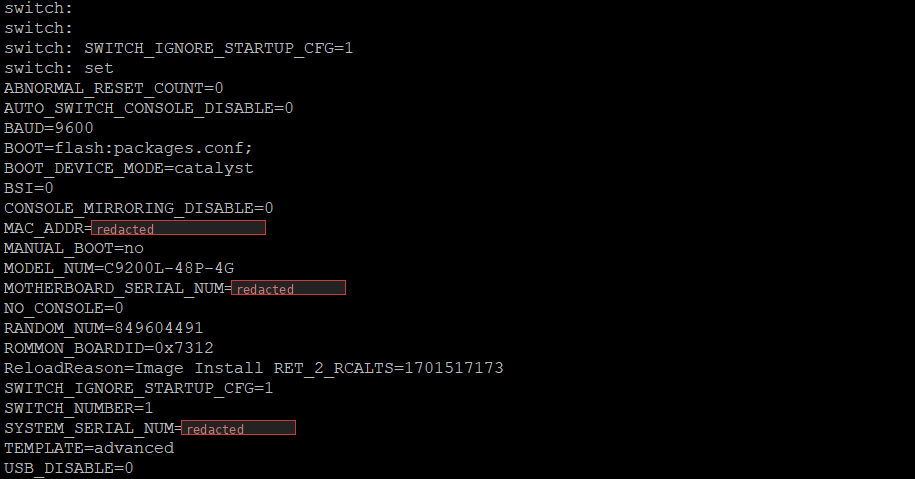
set confirms the variable is present. Note there is no space around the equals sign when assigning it.Step 3 — Boot the Switch
switch: boot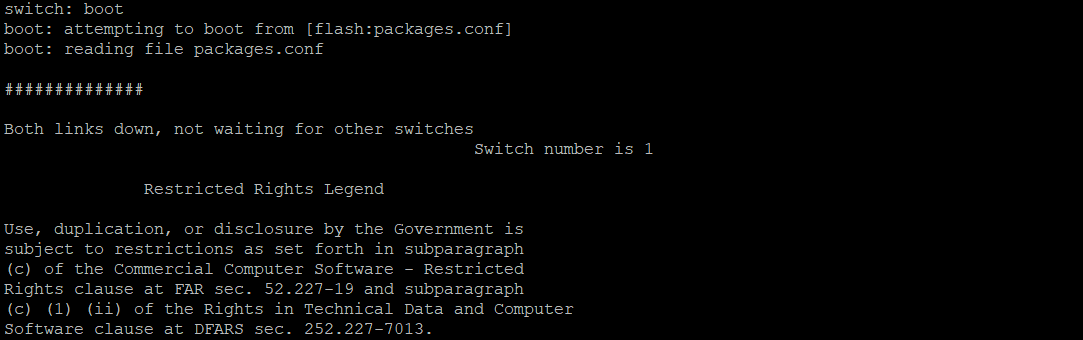
flash:packages.conf as normal, but with no configuration applied.The switch boots with an empty running configuration. When prompted to enter the initial configuration dialog, answer no:
Would you like to enter the initial configuration dialog? [yes/no]: noStep 4 — Enter Privileged EXEC Mode
Because no configuration is loaded, no password is required:
Switch> enable
Switch#
Step 5 — Restore the Saved Configuration First
This is the step whose ordering matters most. Merge the untouched startup configuration into the running configuration before setting any new password:
Switch# copy startup-config running-configThis restores the hostname, VLANs, interface configuration, AAA settings, and everything else that was saved. The prompt changes to the original hostname as soon as the merge completes, which is a useful confirmation that the configuration survived.
Why the order matters.
copy startup-config running-configis a merge, not a replace. Anyenable secretorusernameline in the saved configuration overwrites the matching line already in the running configuration. Setting a new password first and copying afterwards therefore silently restores the old, unknown password — the switch ends up exactly as locked as it started. Always restore first, then change credentials.
Step 6 — Set New Credentials
Switch# configure terminal
Switch(config)# enable secret NEWPASSWORD
Switch(config)# username admin privilege 15 secret NEWPASSWORD
Switch(config)# end
Two points worth noting:
- Use
enable secret, neverenable password. The former is hashed; the latter is trivially reversible. - If the switch authenticates against TACACS+ or RADIUS, keep a local privilege-15 account as a fallback. When the AAA servers are unreachable, that local account is the only remaining way in — which is frequently how a switch becomes locked out in the first place.
If any line VTY or console configuration references an authentication method that no longer works, correct it now while access is unrestricted.
Step 7 — Save the Configuration
Switch# write memoryOr the equivalent:
Switch# copy running-config startup-configThe startup configuration now contains the original settings plus the new credentials.
Step 8 — Clear the Ignore Flag
This is the step most often forgotten, and skipping it leaves the switch booting with no configuration on every subsequent reload. The variable lives in the bootloader, so saving the configuration does not clear it.
There are two ways to remove it.
Option A — From IOS-XE (preferred)
Recent IOS-XE releases can clear the bootloader variable without another trip to ROMMON:
Switch# no system ignore startupconfig switch all
Switch# write memory
Switch# show romvar
show romvar prints the bootloader variables from within IOS. Confirm that SWITCH_IGNORE_STARTUP_CFG is either absent or set to 0. This option avoids a second power cycle entirely.
Option B — From ROMMON
If the command above is unavailable on the installed release, reload and re-enter ROMMON exactly as in Step 1, then clear the variable manually:
switch: set
switch: unset SWITCH_IGNORE_STARTUP_CFG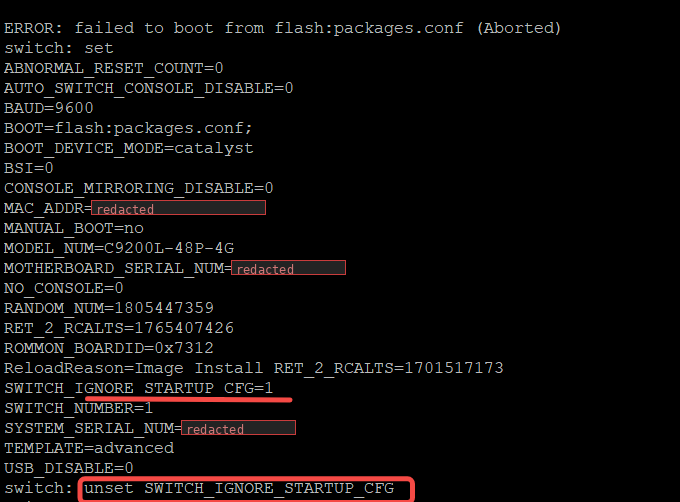
set still shows SWITCH_IGNORE_STARTUP_CFG=1, so unset is required. Note that unset takes the variable name only — no = and no value.Verify the variable is gone before booting:
switch: set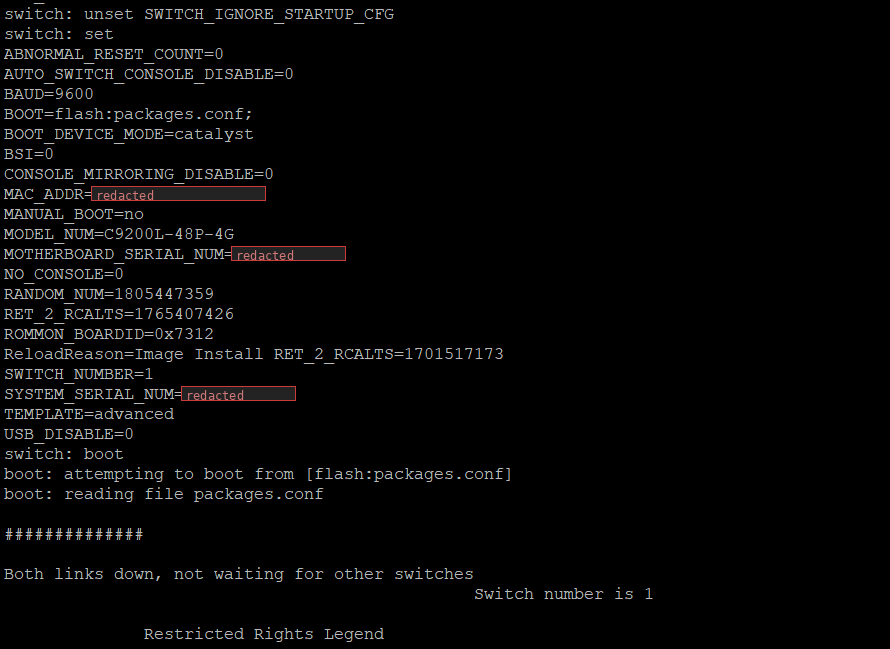
unset, the variable no longer appears in the list and the switch can be booted normally.Step 9 — Boot and Verify
switch: bootThe switch now loads the saved startup configuration and prompts for the new password. Confirm the recovery is complete:
Switch# show running-config | include hostname|username
Switch# show romvar | include IGNORE
Switch# show version
Recovery is finished when the original configuration is present, the new credentials work, and the ignore variable is no longer set.
Quick Reference
1.  Power off, hold MODE, power on, hold 10–15 s   →  switch:
2.  SWITCH_IGNORE_STARTUP_CFG=1
3.  set                                            (verify the variable)
4.  boot                                           (answer "no" to the setup dialog)
5.  enable
6.  copy startup-config running-config             (RESTORE FIRST)
7.  configure terminal
8.  enable secret NEWPASSWORD
9.  username admin privilege 15 secret NEWPASSWORD
10. end
11. write memory
12. no system ignore startupconfig switch all      (or unset in ROMMON)
13. write memory
14. show romvar                                    (confirm the flag is cleared)
Common Pitfalls
- Leaving the ignore flag set. The switch boots with an empty configuration after every reload, which usually surfaces weeks later as an unexplained outage. Always finish with
show romvar. - Setting the password before restoring the configuration. The merge overwrites the new credentials with the old ones, and the switch remains inaccessible. Restore first.
- Forgetting
write memory. The recovered configuration and the new password exist only in RAM until saved. - Releasing the MODE button too early. The switch boots IOS-XE normally instead of stopping at
switch:. - Assuming remote recovery is possible. ROMMON is reachable only over the console port.
- Relying on AAA with no local account. A local privilege-15 user costs nothing and prevents most lockouts.
A Note on Security
This procedure demonstrates that physical access to a switch is equivalent to full administrative control. Anyone who can reach the front panel and the console port can bypass the configured passwords in a few minutes without any credentials.
The mitigations are physical and procedural rather than technical: locked cabinets and wiring closets, controlled console access, and audit logging that records reloads. no service password-recovery does close this path, but at a real cost — the only remaining recovery option erases the startup configuration completely. Enable it only where the configuration is backed up externally and restoring from that backup is a routine, tested operation.